Sunday, 15 May 2016

The best $32 Espresso Machine Money Can Buy


First shote of freshly roasted espresso - look at that crema!
Ok, so you probably know that most espresso machines (Keurigs don't count) are in the thousands of dollars; Breville has a great entry-level, 15-bar single pump espresso machine for $599.99, that we recently purchased at a discount.

After spending 10 blissful days in Italy for our honeymoon, it took several months to adapt back to american food and culture. One element that we missed the most was espresso. Real Italian espresso. Before we signed up for the Citi Thank You card and received 55,000 points, we purchased a Mr. Coffee "espresso machine". I put that "espresso machine" in quotes, because the little guy was basically high pressure drip coffee machine that was on the verge of exploding with each use. 

In our desperation, we kept it anyway. After the handle unscrewed and blew hot coffee grounds on me (twice) and the espresso pot overflowed down the counter, we decided it was time to upgrade. Shortly after this fiasco, I discovered that I could redeem our 55,000 points for $550 in Williams-Sonoma gift cards the Citi Thank You rewards center! After an additional sale at Williams-Sonoma, our new Breville Barista 870XL and pair of glass espresso cups set us back a mere $32 after taxes. That was actually cheaper than the Mr. Coffee "espresso machine" that retails for $39.99!

We now enjoy making espressos, macchiatos, cappuccinos, and lattes. There is really no going back to brewed coffee now (which taste like coffee flavored water now)! When this espresso machine croaks, we decided that is worth paying full price to have quality espresso drinks at home. I would highly recommend this product if you are in the market for one, or are considering going to graduate school.

The Citi Thank You card no longer offers 50,000 points for their card Premier card, only for the Elite card which has a high annual fee of $450. I would recommend either the Amex Gold Card or the Chase Sapphire (50,000 points + 5,000 pts after spending $4,000 in 1st 3 months).

Please see my end of this post about Amex Points details and an additional reward. Feel free to leave any comments or questions you have below. Happy churning!

How to Fix System Idle Process High Problems?

Smart System Idle Process Problem Fixer Pro is professional tool in fixing system idle process problems.


Smart System Idle Process Problem Fixer Pro is designed for people to optimize the speed of computer and to deal with High Cpu Usage issues.

When your computer's cpu is very high, it indicates that there is little space for your System Idle Process or your system idle process running at 99. And at the same time, your pc will run very slowly. Smart System Idle Process Problem Fixer Pro is designed to help users automatically diagnose and fix hundreds of Windows problems and system errors. It is extremely easy to use and is the best way to keep your PC running fast, smooth, and error-free.

Smart System Idle Process Problem Fixer Pro is completely different from other system software. This tool can be supported by many languages which are very convenient to change languages. Most importantly, this tool runs fast and efficient which will save your precious time. What makes it stand out among its competitors is the fact that Smart System Idle Process Fixer Pro can be your one-stop software as it provides holistic approach in improving your PC system. Simple procedure, amazing effect.

Smart System Idle Process Problem Fixer Pro is suitable for all people who want to optimize their PC.

Apart from its general abilities to fix System Idle Process Problem, Smart System Idle Process Fixer Pro can also speed up your computer performance, deal with specific technical areas of your computer system, safeguarding them from unwanted errors or manipulating your system to let your computer operate on its full abilities. What makes it a hit in the industry of computer is the fact that it can save a lot of people from the pricey cost of computer and operating system repairs.

Using Smart System Idle Process Fixer Pro to keep your PC from errors, you conveniently save your computer system from breaking down and losing significant files.

Download below:  http://www.lionsea.com/download/fixer/Smart_System_Idle_Process_Problem_Fixer_Pro_Setup.exe

How To Enhance PC Gaming Performance


1. Power up

PC games will have two sets of system requirements, the minimum and recommended. Those minimum requirements will enable you to install and boot up a game, but when started, graphics and performance will be disappointing. To get going, you will want your system to meet with recommended system requirements. That is likely to mean a starting point of a quad-core processor, 4GB of memory and a decent graphics card with 1GB of its own memory for modern high powered games.

2. Graphics card upgrade

If your system does not meet the requirements, look first at your graphics card. Though you can spend a fortune on this particular upgrade but it is unnecessary if you are a casual gamer. Something like the NVidia GeForce GT 640 (USD165) is affordable and will deal with almost anything you throw at it.
If you are not considering a new graphics card you can always check its manufacturer’s website of your current card for updates which provide addition performance from their hardware.

4. Maximise gaming power

Certain programs still run while you are playing your game. Game booster 3 is a neat and free application that will shut down any non-essential programs and processes while you are gaming. Game booster 3 ensures your games are not forced to share resources with other programs

5. Anti-virus scans

Viruses and spyware can lower computer performance therefore it is good to ensure your anti-virus software is running and up to date.

6. Check the game’s settings

If your game’s graphics are skipping around and a low frame-rate is affecting your gameplay, go to the Settings screen.  Turn down settings such as Texture and Shadows. Reducing these will not materially affect your gameplay, but it dramatically lessens the workload the system has to take on.

7. Defrag

Confirm your drive is defragged regularly. A fragmented drive with files scattered in pieces all over it will disrupt your gameplay. The Windows 7 Defragmenter is adequate, but Au logics Disk Defrag Free or O&O Defrag Free Edition are also for consideration.

8. Switch to a SSD drive

Another great way to speed up your PC’s gaming capabilities is to upgrade to a SSD drive. Compared to your existing hard drive, these are lightning fast, and will make your games fly. A 120GB SSD drive will cost less than USD130.

9. Upgrade your mouse and keyboard

 Upgrading your mouse and keyboard can yield some serious gameplay improvements, by offering customisable settings and quicker speeds.

10. Get a wired connection

If you are into online gaming, a wired internet connection is advised. Power line adapters like Advent’s APWL-2012 200Mbps kit offer a neat and tidy solution. You can then use your home’s mains electricity cables to pipe your broadband signal between rooms. Software such as the free TCP Optimizer will help you get the best out of your internet connection.

11. Adjust for best performance

  • Click Start.
  • Right click Computer.  
  • Click properties.
  • Click advanced system settings.

If you are prompted for an administrator password or for a confirmation, type the password, or click Continue.
  • On the Advanced tab, click Settings under Performance.
  • On the Visual Effects tab, click Adjust for best performance, and then click OK.
  • Click OK to close the System Properties dialog box.

This can be undone when finished with gaming.

How to Order Goods Online

                                         
Advancement in technology has made the world a global village. Entering few digits on you cell phone can connect you to anyone over space and time. Moreover, connecting as linking up with people cost you little or no stress this day, ordering goods from anywhere in the world and receiving at your doorstep has become nothing but a piece of cake.
Image result for package pics
From groceries to automobile there are lots of websites waiting for you to click. If you are in desperate need of any item, there is always the right website at the right frequency for you to tune to. For instance, Ebay, Amazon and Bestbuy have a broad range of consumer goods both new and used for your consumption.
All that is required of you to get connected is a computer or mobile phone with internet connection and a credit or debit card. However, for sites that dost allow a debit card, you can open a Paypal account
Steps Involved in making your orders
 Locate the Item
There are thousand online stores and warehouses selling different consumable goods and rendering diverse services globally. However, It is not mandatory you must order from your country, orders could be made from anywhere in the world provided the shipper is ready to ship to your location. You can easily identify the website to order your goods through Google search or other search engines. Google can help you find the perfect and best website for whatever you are trying to find.
Make a review of the website
It is pertinent to note that, there are lots of fake online store just as there are genuine ones. To be on the safe side, you must take precautions. Try and research online to have crystal clear information as regards the pedigree of the identified websites.  Read peoples' review and comments on such websites, a lot of consumers are bound to post their experiences online which are available for your consumption. Also, endeavour to contact the customer care representative and observe their responsiveness, attitudes and reactions to varying situation.
Register with the store
After you have been able to make your clarification, registration is, however necessary. Input the necessary and required information and register on the platform.  The following information will be required;
 bio-data shipping address
billing address and,
credit or debit card information if necessary
Ensure the website is trustworthy before you input your credit card information. For websites allowing payments to be made through Paypal, it is advisable to pay through Paypal for security reasons. Paypal has a security measure put in place to ensure “payback guarantee” when you are being defrauded.
Place your order
             Congratulations if you are successful with the previous steps. Before taking your final decision, ask questions about the item from the seller, look at other buyers’ review of the seller and when you are satisfied, click on buy it now. If your card or account has been registered with the website, the fund will be automatically deducted from your account.
             Wait for delivery.
                        The good will be delivered to your shipping address. Examine the item and file a report it the item is not as described or damaged. Also, if you are unable to receive your consignment after the expected delivery date, in the case of eBay, you can seek for a refund.

Friday, 13 May 2016

HOW TO INCREASE RAM IN ANDROID PHONE USING SD CARD

    Requirements:

  • 1. SD card as you want but class 4 or higher SD Card will give excellent speed to your Phone.
  • 2. Rooted smartphone. Or Rooted Tablet (If you want to increase RAM and Internal Memory of it.)
  • 3. SD card reader
  • 4. Windows PC
  • 5. An internet connection for downloading a few software or you can get it from somewhere else also.
  • Partition Your SD Card:

    First step you have to do is to partition your SD Card and for doing this you have to,

    1. Download Mini tool Partition from Here


    2. Install the application on your PC and connect your SD card to your PC with Card Reader.

    3. Open Mini Tool Partition in your PC and when the wizards open click on your SD Card and select Delete option. (Note: This will format your SD Card completely mean that it will erase your data permanently, so previous to doing this backup your data at any place in PC or other Storage device.)

    4. When the Formatting of your SD Card is completed then, you have whole of space of your SD Card as unllocated then Right click SD Card and select make option.

    5. A popup box will open giving you options for making partition; select the partition as primary and file system as FAT if SD Card is less than 4GB or FAT32 if your SD Card is more than 4GB.

    6. Leave about 512 MB or more space (your choice) for making the next partition.

    7. Then select done and do right click on unllocated space of your SD Card and again click make option. Select Primary partition but change the file system to Ext2, Ext3 or Ext4.

    Note: (Ext2 is not compulsory as most ROMs work fine with it).

    How To Make Ram Of SD Card Android:

    1. Click Apply Changes and then process goes on for the few minutes and then partition is completed.

    2. Install Link2sd from Google Play or download and install the .apk format file from here to your phone.

    3. On the first launch of the app, it will question for root permissions and then, it will question you the file system of the .ext partition that you had before made, choose the option as you had choose in the partitioning steps.

    4. Sort the apps according to size and start linking them.

How to use Pen Drive as RAM in Your Computer in Window 7, XP and Vista

Many of the programs in the system uses lots of memory during operations. The processing speed of a system depends on RAM. For those systems which has low RAM this will be a nightmare. So to solve this problem use your pendrive or USB as a RAM.
Using pendrive as a RAM increases the system performance. It is not a difficult process you can easily do this with the help of the following simple steps.
First insert your pendrive (minimum 2GB recommended).
Format your pendrive.
1
Insert your pen-drive. Let your PC read it. Make sure to delete all the stuff on it first.(Minimum 2 GB)


3
Click on Advanced tab.
 4
Click on Settings under Performance.
 5
Click on Advanced tab.

6
Click on Change button under Virtual memory.

7
Select your USB drive.


8
Click on custom size radio button and give the values as follows;
  • Initial Size:1020
  • Maximum size:1020
  • The size depends upon your free memory capacity of your pen drive. So you can change this limit according to your pen drive size.

9
Click on Set button, then click on OK.
10
Now you have to restart the computer with pen-drive inserted. The speed of your computer will be increased.

How to open the Advanced Startup Options menu in Windows 8 and Windows 8.1


The Advanced Startup Options menu is used to access all the tools that are provided for diagnosting, repairing, reseting, or rehreshing Windows 8 or Windows 8.1. From there you can choose some of the offered modes to boot the Windows, such as Safe mode, Low-resolution mode, debugging mode etc.
The are many ways to open the Advanced Startup Options menu in Windows 8 and Windows 8.1. In this article we will show you only the easiest 3 ways.


Method 1: From your PC settings:

1. Open the Settings menu from the charms tab from the right top corner:


Then choose Change PC settings from the bottom of the menu:


Next, open the General menu, and click the Restart now button under Advanced startup:


After your computer restarts, Advanced Startup Options menu will appear.

How to solve slow speed of pc?

The first step to fixing a slow computer is to verify that your machine is the actual source of the problem. Videos that seem to buffer forever, and websites that take ages to load, may not be your computer’s fault. Geek Squad agent Derek Meister claims that many people mistakenly identify a slow system as the problem when “it’s actually not the computer, [but] their broadband connection.” See “Downloads are taking forever” below for instructions on how to use Speedtest.net to diagnose a slow connection.
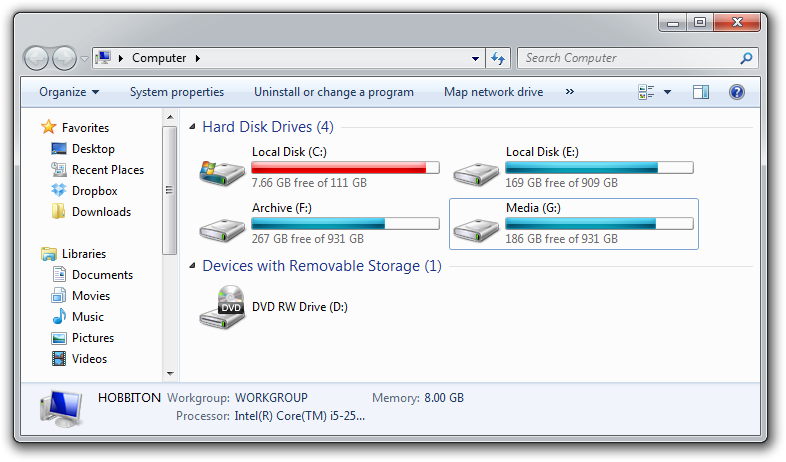
If the problem is your PC, check whether you have plenty of free space on the hard drive holding your operating system. Windows needs room to create files while your system is running. If your hard drive is maxed out, performance suffers. Now is the perfect time to clear some space.

If your computer’s operating system resides on an overstuffed C: drive, clearing out some space could boost OS performance.

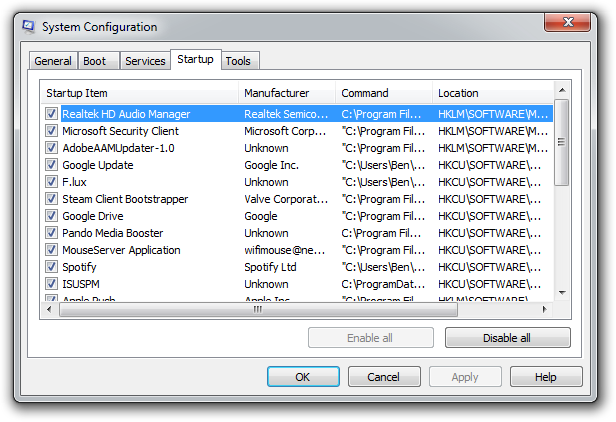
Microsoft’s System Configuration tool is your next-best bet for tackling slow performance. Many applications launch automatically when your machine boots up, which can stretch out boot time—especially on older, slower PCs. Make a habit of trimming the startup items. Open the tool by pressing Windows-R, typing msconfig, and pressing the Enter key.
Checking the Startup Item and Manufacturer columns is the best way to figure out which potential performance-killers you can safely disable. Avoid messing with any of the services and programs that have Microsoft Corporation listed as the manufacturer. Items such as AdobeAAMUpdater, Google Update, Pando Media Booster, Spotify, and Steam Client Bootstrapper are all fair game. Regardless, err on the side of caution: If you’re not sure what the program or service does, don’t disable it.

Windows’ System Configuration Tool lets you disable programs and services that automatically start when you boot your computer.

Once you’ve made all your changes, click OK and restart the computer. It should boot up quicker and feel noticeably faster.
Source:http://www.pcworld.com/

How To Remove Shortcut Virus From PC By Steps

If your PC or Pen-drive show any shortcut of the folder and its not delete then you must remove using this method, may be your computer infected with "Shortcut Virus", to remove this virus please follow given steps : 
Method : Using the Command Prompt
1. Open command prompt. Go to Start, then Click Run, and type "cmd" . Press enter. See Screen Capture -
how to remove shortcut virus from pc-step1
2. Type "cd\" and press enter to get to the root directory of cd.. (Two Times) And Press enter. See Screen Capture -how to remove shortcut virus from pc-step2

3. Type "attrib -h -r -s autorun.inf" and press enter. Or copy and paste(paste only working with right click), See Screen Capture -


4. Type "del autorun.inf" and press enter. See Screen Capture -

Note  : In this image not autorun.inf file because my PC have no shortcut virus5. Repeat all this process with other drives, type "d:" and press enter . Then next "e:"

Restart Your Computer And Enjoy.

Watch This Video

How To Find Free Internet Games

Following the current trend of "Zombification", the widely used game Zombie Farm is appropriate up there using the best. Combining monsters with farming provides players with some from the more pleasurable aspects of iPhone gaming. Plant crops, harvest zombies, and beat the farmer; whatever one does, mafia wars will most likely keep you entertained for a long time.


We had the opportunity to get our practical the sport, and it's definitely coming along. It's impressive that PopCap didn't force clear-cut shooter roles towards the zombie and plant classes, although there are a handful of familiar types, like healers and heavies. I first tested the football jersey-wearing All-Star zombie, who is well-equipped which has a machine gun, grenade, and a drop shield. He also includes a powerful dash move which can cause a couple instant kills, provided the dash is well-aimed. I then used the highly mobile Engineer, who are able to temporarily traverse over the map at high speeds by traveling with a jackhammer. He can also call in an air strike using his drone, which can also fire pulse rounds at nearby plants.  Infestation Survivor Stories.

First, there's a pair of Plants vs. Zombies toys 10 action figures designed by Metaplasmico from Deviant art! This set is extremely detailed and appearance just like the famous creatures from your game. There are all your favorites, such as pea shooter, Sunflower, Watermelon, and all the not so good guy zombies too! They all can be found in their unique little plant pots. You can use them to guard your desk or line them up inside your garden for the realistic charm!

Leader- Your own leader may be the most beneficial at recruiting some other survivors with a 100% recruitment rate. Your current leader could be the crucial person as part of your group simply because not having recruiting additional survivors, you may never be capable of pull through. You undoubtedly really need about 1 leader but it really is more preferable to possess 2 in the event 1 dies in a unfamiliar event

Actually, it had been among the sequences of running/fighting for the Kowloon Rooftop, which provided me with a real tactile experience so real, you forget that you're actually playing a pc game rather than experiencing this in person. Maybe I am getting a tad too captivated, or had diet program those holidays spirits while I was playing the overall game, but nonetheless I have never experienced a casino game like Black Ops before, never.

How to Transfer Music from iPhone to Computer

Wondering how to transfer music from iPhone to computer? Actually, there are dozens of software that can help you to transfer iPhone songs to computer. Considering simplicity and practical applicability, you are highly recommended TunesGo (Windows) or TunesGo for Mac, both of them are easy to use and works well with all iPhones.

Now, download the free and trial version of TunesGo on your computer to have a try!

www.iphone-ipad-recovery.com/downloads/ios-manage.exe www.iphone-ipad-recovery.com/downloads/mac-ios-recovery.dmg

How to transfer music from iPhone to computer


Step 1. Run the program and connect your iPhone to the computer

Before the transfer, you need to download, install and launch the iPhone music to PC transfer on your computer and connect your iPhone to it. After that, the program will detect your iPhone.

Note: To copy iPhone music to computer, you should install iTunes on your computer. But duiring the process, please don't run iTunes.

TunesGo fully supports iPhone 5s, iPhone 5, iPhone 5c, iPhone 4S, iPhone 4 and iPhone 3GS.

Step 2. Transfer music from iPhone to computer

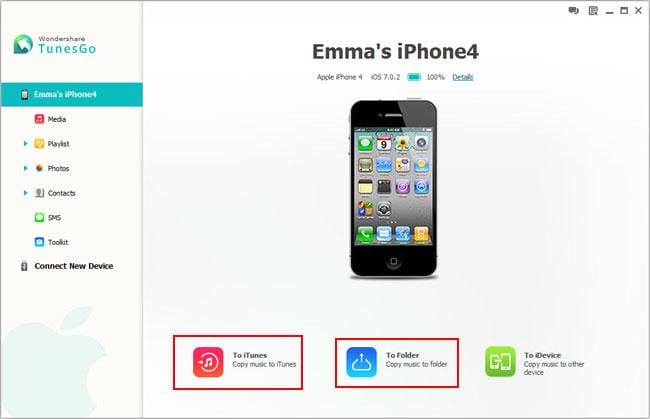
In the main window, click "Export Music to Folder" at the bottom line. Then, your iPhone music will be instantly exported to the computer.


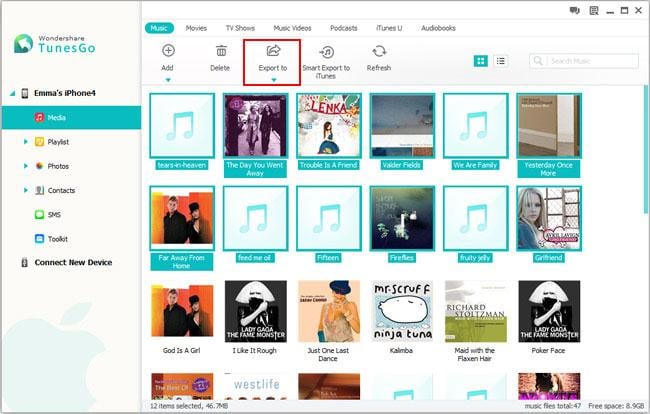
Actually, you also can copy iPhone music to computer in this way. Click "Media" in the left column to bring up the media window. There is a top line in the media window. Click "Music". Then comes to the music window and mark those songs you want to export and click the little triangle under "Export to". A drop-down list appears. Here, you need to select "Export to My Computer". After that, choose a location to save the exported songs on the computer.


Moreover, this professional iPhone to computer data transfer also can help you transfer your music from computer to your iPhone.

How to Transfer files from Laptop to Android via WiFi – Best Ways

Today there are lots of apps available on Google playstore which provides you the facility to share files from between your PC or laptop and Android device wirelessly via WiFi connection for free of cost.These apps works by creating a common network between your laptop and android smartphone and thus allowing the option to transfer files between each other.Here below I am discussing some of the popular free apps that can be used to share files on Android over a network.Follow the below given instructions to learn How to Transfer files from Laptop to Android via WiFi.
How to Transfer files from Laptop to Android via WiFi

How to Transfer files from Laptop to Android via WiFi – Best Apps

Using WebSharingLite File/Media Sync :

Websharing Lite is a Free App that allows you to wireless transfer files to and from your phone or tablet and your laptop or PC using a web browser.This app doesn’t require any setup or something else you just need to install it on your Android smartphone or tablet and rest work will be done by the app aut

How can user update the OS from Windows 8 to 8.1


Get the free update
 Ready? Now you can download the free update from the Windows Store.
1.        Go to the Start screen, and tap or click the Store tile.
Description: Store tile on Start
Store tile on the Start screen
2.        In the Store, tap or click the Windows 8.1 or Windows RT 8.1 update. if  you don't see the update on the Store home screen,
3.        Tap or click Download.
4.        The update will download and install in the background while you use your PC to do other things. The installer will check to make sure you have enough disk space, that your apps and devices will work with Windows 8.1 or Windows RT 8.1, and that you have all the required updates.
In some cases, the installer might find something you need to take care of before you can continue installing the update. If so, you'll see a message telling you what you need to do.
Note
·         If the installation is interrupted for any reason, you can restart the update from where you left off by going back to the Store and downloading the update again.

How to Backup Your Windows 7 Based Computer

Don't reduce your essential information and information files. Don't be the sufferer of a hard generate accident or viruses/malware/spyware.You need to back-up your information files regularly. It is a good addiction to get into. My term is don't wait, back-up these days. First you will need to figure out where you have your essential information files. Most of enough it will be in your Records directory or on your desktop computer. Sometimes you may have put information in other places and you can do a look for for those information files. Before you begin doing your back-up create sure you close all open programs that contain information you want to back-up. Here are the basic techniques on how to back-up Windows seven with the built in back-up application. Click the Start key, select Control Board, then select "Back up your computer" under the tab "System and Security." Step 1: Returning up your pc. If you've never supported up this pc before, just click "Set up backup" and let the expert guide you. You may have to have manager authorizations to do this and if you are on a work system, hopefully the system manager has a system based back-up program. If you don't have manager authorizations, you can ask your system manager to do the rear ups for you. I would suggest that you use a usb memory card for the back-up and create sure you store the usb generate in a protected business. Most customers can let the windows expert pick which information files and files to support, but if you have some accessories information files, images in places that you had to look for for, now is enough a chance to add them. Step 2: Select information files and files. You can also select to routine frequent back ups, which I would suggest that you definitely do everyday back ups.Depending on your needs, select Daily, Every week, or Monthly. This is essential to create sure that you have frequent back ups. Step 3: Schedule frequent back ups. Windows will set up the back-up and get started.It will take a while for initially back-up due to the fact that there are assign of information files. Step 4: Backup is in improvement.The screen will show the current back-up in progress That seems very simple. Don't risk losing your information, Don't Delay back-up these days. Don't put it off, you don't want to reduce useful information, better safe than sorry. If you ever need to do a recover of your file(s) look for an future article on how to do the recover of the information files. The expert on Windows seven back-up is very easy to understand.

HOW TO INSTALL WINDOWS XP

1.First of all we need windows XP CD.
2.Insert it in CD/DVD ROM and restart your PC
3.You can see a window. FOR BIOS SETTINGS-PRESS F2 and FOR BOOT MENU-PRESS F8
   for some pc it is F10
4. PRESS F8/F10 (do it quickly )
5. In boot menu select CD/DVD ROM and press enter
6. Now press any key to boot from CD....
7.You can see a window Welcome To Setup
     ENTER=CONTINUE     R=REPAIR    F3=QUIT
8.Select enter to continue or Repair.
9. Licensing agreement appears press F8.
10.Select any partition and press D, then enter and then L.
11.Do same for other partitions.
12. Now press enter and then Format the partition using the NTFS file system (Quick).
13.Please wait while setup formats the partition.
14.PC gets automatically restarts.
15.product key is on the back of the CD.
16.Then regional and language options press next by selecting your region.
17.Type pc name and pass word.
18.Set date an time.
19.Now your pc is ready for use.
20.Install audio and video drives.
21.Go to administrative settings and turn off windows update for lack of hard disk space.
22.Windows defender is the best anti virus  update it.

How to Run Android Apps on a PC Using Bluestacks part 2

4. Setting up BlueStacks Cloud Connect

An optional step for users with an Android smartphone or tablet is to set up BlueStacks Cloud Connect, an app that allows you to push apps from your Android device to BlueStacks, and vice versa. Download Cloud Connect for your Android device, and then go to the Settings button on BlueStacks and click on "Cloud Connect".
If you have an Android phone, input an email address as well as your phone number. You will then receive instructions via email and SMS on how to connect your phone to Bluestacks, push apps, and sync SMS.


Android Pc smartphone windows

If you're running an Android tablet, you instead just use an email address to synch BlueStacks with your device. After registering BlueStacks Cloud Connect, you should receive an email containing a PIN number, which you input into the Cloud Connect app.
You should now be able to push apps between your device and BlueStacks. You're essentially istalling the same app on your desktop and mobile device, without syncing app data (such as login credentials or game progress). Still, it's an easy way to copy apps from your device to BlueStacks, or vice versa.

5. Installing & Running Apps

If you're not going to sync apps to and from your Android device, you can just use the built in App Search to search for and install apps from Google Play, Amazon, or 1Mobile.
It may seem confusing at first, but BlueStacks won't let you get to its three built-in app markets directly. You'll need to go through the App Search button. Type in the name of the app you're looking for, and it will search 1Mobile, Amazon, and Google Play for matches, and give you the option to install apps from any of the above three stores.
Once you've accessed one of the three app stores, you can then navigate that store. Within Google Play, for instance, you can take advantage of the store's search and other features.

6. Controls & Settings

You should now have everything you need to install and run apps from BlueStacks, so we'll finish up with some extra notes on in-app controls, as well as settings. Unless you happen to be running a touchscreen rig or a Windows 8 tablet, you're going to need some way to approximate pinch to zoom, as well as tilt controls.
Pinch to Zoom: Control +, or Control -
Tilt Controls: 'Z' or 'X' can be used to simulate tilting a device left or right.
BlueStacks supports the use of gamepad controls for many apps, which will be a godsend for users looking to play Android games on a PC. Plug in your controller, and Bluestacks should inform you if a particular app supports a controller.
Finally, the Settings menu (gear icon) contains assorted system settings for language, keyboard settings, contacts and account management, and an app manager for uninstalling applications and setting their default sizes.
There's your quick visual tour of the BlueStacks App Player. It may not run every Android app perfectly, but BlueStacks puts you just a mouse click away from thousands of compelling choices.

How to Install Impossible Creature Insect Invasion


1.       Install Impossible Creatures (Full Version)
2.       Download :
-          Insect Invasion (86 MB) just click it if u haven’t download
-          Insect Invasion Patch 1.4
-          IC Crack
3.       After you installed IC full version, you should install :
-          First, u must install Impossible Creatures Update 1.1 (English)
-          And then install Insect Invasion (86 MB) (extract it until finish)
-          After that, install Insect Invasion Patch 1.4
-          Go to directory location of IC and copy IC Crack to replace another IC shortcut
-          In IC Directory Location (C/Program Files/Microsoft Games/Impossible Creatures), click Impossible Creatures Insect Invasion and lets play it!!!
-          If IC stil not running, just go to IC Directory Location (C/Program Files/Microsoft Games/Impossible Creatures) and click Impossible Creatures logo with “red yello blue colors” (see the screenshot below)
-          Just wait it running until finish.. and try to run shortcut Impossible Creatures Insect Invasion and play it!!!
Thank you.. if u have any question about the installation, just contact me on teddinatorselfaction@ymail.com
I have install it on my PC Desktop with OS 7 and it worked!!

How To Get Free Minecraft Server Hosting

Minecraft, an amusement which had been there for long has experienced various amendments. On the other hand, with all these progressions, the amusement keeps on  the most loved of our time. When you wish to begin a little Minecraft server in your home workstation to play with one or two of your companions, you simply need to design the Minecraft in Linux or Putty. In the event that yours is a Windows working framework, you can begin a free Minecraft facilitating administration by accompanying the guidelines given beneath: 


Download the  Free Minecraft Server Hosting  from the official diversion site. Keep it spared in a particular organizer which in future might hold all your Minecraft documents. When going further, determine that Java form 6 or later is introduced on your PC. This is an absolute necessity on the grounds that the various past variants produce blunders which may make the establishment of the downloaded programming something by unimaginable. Done this, move ahead with the executable record, open it. This begins the immediate setup of the Minecraft  server on your machine. Disregard the lapse messages which may appear amidst. Upon its finish, you are obliged to build the memory of your Minecraft server. To attain this assignment, simply open a notepad document and glue the accompanying code:

"C:\program Files\java\jre6\bin\javaw.exe" -Xmx2048m -Xms2048m -jug "Minecraft_server.exe". This document brings the index which you are utilizing to design the Minecraft server. Done this, you are obliged to rename the index as "run.bat." Save it in your Minecraft organizer. By doing this, you expanded the memory of your Minecraft server from 100mb to 2gb which is by and large viewed as acceptable to play the amusement for quite a while.

Nonetheless, when the diversion begins picking up force with more of your companions joining the energy, your workstation may confront an extreme opportunity to adapt up to the additional weight it is compelled to handle. This may get to be truly pestering with the amusement getting disturbed now and again. Furthermore it could be viewed as a cautioning indicator alarming you on the prerequisite of a paid server for the same. A paid server offers more excellent strength and enhanced execution permitting you to delight in the greatest energy the amusement offers. Selecting a paid administration for your Minecraft amusement might never make a circumstance where you are settled on to lament your choice. Minecraft is a diversion which permits the free minecraft  stream of one's imagination and soul of undertaking. The fortune chasing in the diversion is made risky with the vicinity of irate beasts which are sitting tight for you to arrive at there. Also when you head off excessively near them, you get murdered. Also when you restore the diversion with recharged freshness, you are obliged to discover all the fortune which you had chase awhile ago on the grounds that when you kick the bucket, all these get scattered.
In case you are seeking managed Minecraft server hosting companies then you will need not be concerned much as you could come across them on the net plentifully. But, just before going with them you should understand specific fundamental issues with regards to the services offered from the rental server companies
Technical Specifications a Rental Server Has to Have:
You ought to think about the technical specifications provided from the rental companies and compare them to additional selections of other rental server companies. Therefore, you will be able to make a decision on the amount of players to be hosted to work with the server and also the volume to be used in sustaining it. The server you choose for this objective has to be accordingly strong to adapt towards the quantity of users specified by you. The details of your rental server should consist of RAM allotted, allotted disc space, speeds offered to upload and download the video game, power of the CPU applied, and also the bandwidth utilized for sustaining it. The volume on the hard drive must also be regarded when negotiating with a rental server provider as a SSD drive is regarded much better for quicker performance than a normal hard drive.
Benefits Supplied and Things to Take Into Consideration While Choosing a Minecraft Server Rental
Various rental server companies offer you various sorts of services and benefits. A number of them offer you tailored services though others present free rein to use them as per your wish. Though you will be in a position to decide on a server per your requirements you could still get the following advantages with quite a few server rental businesses when you are cautious in bargaining with them.
Installation of Plugins, Wrappers, and Mods
Many of the servers enable you to use wrappers as per your needs. Although, this service is not provided by each of the providers. You ought to ensure about their installation when you've got the choice for particular plugins or mods.
Presented Privileges as Well as a Control Panel
Several of the minecraft server rental hosts supply you different administrative privileges, to permit you to install plugins and mods needed for you to modify the files, and give you a portal chock-full of add-ons to customize their use. Specific providers offer restricted rights as well as others offer control panels for controlling the server for administrative work. You ought to check the details of those privileges before sealing the deal.
Customer Support and Upkeep Services Made Available:
A few of the rental server companies supply client assistance and upkeep services around the clock. You'll want to check regarding the runtime service conditions and extent of maintenance services provided by them ahead of finalizing the rental deal with the service companies. The responsibility of keeping the server up to date using the most up-to-date technologies should also be concluded ahead of time.
Back-Up Facility and Safety of Data:
You need to also speak about the measures employed by the rental server host with regards to the safety of the information along with the common backup supplied by the provider.
Uploading the Existing Downloads From Other Servers
It is best to also know whether or not the Minecraft dedicated server hosting company will permit you to upload information retrieved from other servers, to work with them fluently in a single place.
Altering the Terms And/or Upgrading the Server
You ought to opt for the companies that provide change of plan possibilities for the users of their services who discover the current plan to be not suitable for them. Additionally, a few of them supply upgrading of your servers if you are not happy with the efficiency of it.

Offer of Money-Back Guarantee:

A few of the providers offer you 7 to 10 days total money back guarantee considering some don't allow any such guarantee, so you must check for such promises ahead of getting into the agreement.
Extra Features:
Some extra options are supplied by a few of the providers to provide extra quality for the efficiency of Minecraft. It is possible to choose them if you want, but be aware that they could possibly charge appended fees for these services.
Packages Made Available:
A number of the service companies supply particular bundles on the basis of quarterly, monthly, and yearly payment schedules. It is possible to evaluate these packages with other hosts coupled with other features offered by them to select the ideal one for you personally.
Thus, it is possible to avail various benefits from Minecraft server rental providers when you select one appropriate for you by taking the many precautions established above.


For More Information Regarding To The Free Minecraft Hosting Visit Our Official Site: www.FreeMineCraftServerHostings.com